NOTE
2.3 Full-Link Load Testing
Traffic marking, data isolation, test-data construction, and tooling for full-link load testing.
This is a historical learning note and may contain outdated or incomplete understanding.
1. What Is Full-Link Load Testing
- Test the maximum system-wide load while performance remains acceptable.
- A normal load test may target one endpoint or subsystem; full-link testing exercises the broader end-to-end system.
2. Why Full-Link Load Testing Is Needed
- Find bottlenecks across the system so they can be optimized or expanded.
- Verify whether the overall system can support forecast demand.
3. How to Design Full-Link Load Testing
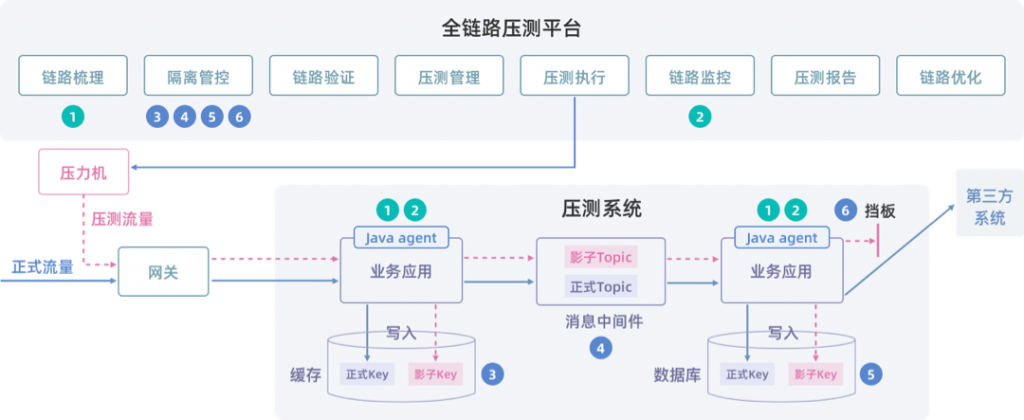
3.1. How Business Systems Distinguish Test Traffic from Normal Traffic
- Add a controlled test marker at a trusted ingress, for example in RPC metadata.
- Propagate that marker across the call chain.
3.2. How to Isolate Test Data
- MySQL: shadow database or shadow tables.
- Redis: shadow keys or isolated data source, often with short TTLs.
- Kafka: shadow topic or governed message metadata.
- External third-party APIs: mocks, sandboxes, or bounded test accounts.
3.3. How to Construct Test Data
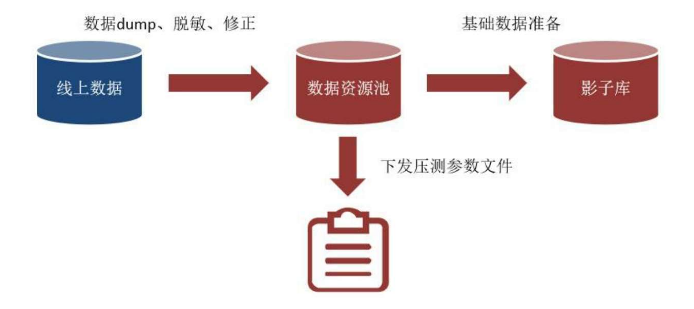
- If production-derived data is required, use authorization, minimization, and desensitization before loading it into the test data pool. Prefer synthetic data when it can reproduce the needed distribution.
- Persist data into the shadow environment.
- Export request parameters for the target scenario.
3.4. How to Generate Very Large Test Traffic
- A load platform can coordinate load generation, real-time monitoring of the load engine and call-chain nodes, and final reporting.
- JMeter is one possible load generator.
4. Full-Link Load-Testing Components
4.1. Takin