
NOTE
3.1 Distributed Load Testing with JMeter
JMeter distributed load-test node configuration and execution.
This is a historical learning note and may contain outdated or incomplete understanding.
1. What Is Distributed Load Testing
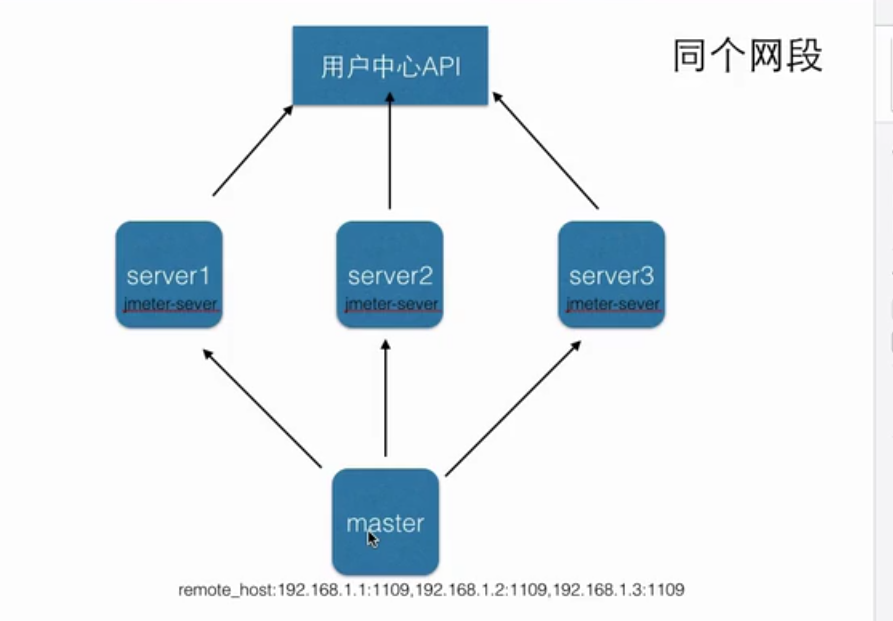
When one load-generator machine cannot produce enough traffic, a JMeter controller can coordinate multiple remote JMeter servers. Each remote server runs the test plan, so the total generated load scales with the number of workers.
2. Build a JMeter Load-Test Setup
2.1. Environment Variables
Ensure the controller and workers use compatible JMeter/Java versions and have the same required plugins and data files.
2.2. Load-Test Nodes
2.2.1. Master Node
Configure the remote hosts and RMI settings according to the current JMeter documentation. Keep RMI SSL enabled and configured for production or cross-machine use; only disable it on a trusted isolated network after explicitly accepting the risk.
2.2.2. Slave Node 1
Start a remote worker with:
./jmeter-server2.2.3. Slave Node 2
Start the second worker in the same way and ensure its network/RMI ports are reachable from the controller.
2.3. Start the Load Test
- GUI mode: suitable for creating and debugging a test plan, not for running a formal high-load test.
- CLI mode:
./jmeter -n -t ./test-plan.jmx -r -l ./result.jtl -e -o ./report