
NOTE
1.1 Nginx
Nginx 原始学习笔记:特点、配置、Lua、优化、通用配置与 FAQ。
这是历史学习笔记,可能存在过时或不完整的理解。
1. Nginx是什么
是一个旨在解决C10K问题的Web服务器。 可以用作
- 虚拟主机 即一台机器虚拟出多个网站
- 反向代理 代理上游的服务器
- 负载均衡 在反向代理的基础上可以进行负载均衡
- 缓存 在反向代理的基础上可以实现Nginx本地缓存
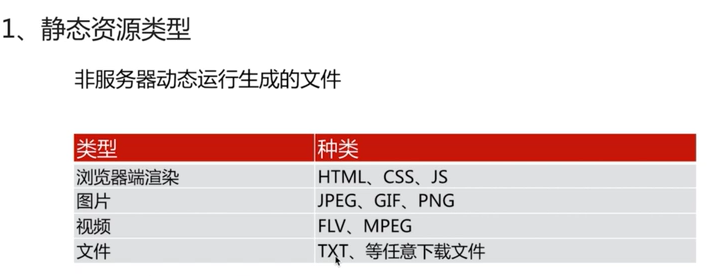
- 动静分离 Nginx 可以直接处理静态文件,并把动态请求转发给后端应用服务(例如 Tomcat)。
2. 特点
2.1. IO多路复用epoll
-
首先IO有两阶段的操作
- 等待数据到达内核区
- 把数据从内核区复制到用户区
-
然后Unix IO模型根据这两个阶段的处理,可以分为两大类:同步(第二阶段是阻塞的)和异步(两个阶段都不阻塞)
同步根据第一阶段的处理又可以分为
- 同步阻塞 数据没准备好,调用时卡住
- 同步非阻塞 数据没准备好,调用直接返回。继续调用
- IO多路复用 数据没准备好时,应用可以阻塞在多路复用等待接口上;一个线程可以同时等待多个文件描述符,而不是为每个连接分配一个线程。
- 信号驱动 数据准备好了,由操作系统负责通知应用
-
接着说明IO多路复用 传统的网络编程服务多个用户的时候使用的是多线程,但是操作系统的线程数是有限的,分给每个进程的线程数就更加有限。 Linux下一切皆是文件,socket连接也是文件,IO说白了就是读写文件,因此上面的IO模型可以用于网络编程。 I/O 多路复用可以让一个事件循环管理多个连接,每个连接对应的文件描述符注册到 epoll 等事件接口上,
 当有读写数据的时候通知给上层应用进行处理。
 -
最后select、poll、epoll的区别
2.2. CPU亲和
把Nginx的worker进程固定在一个cpu上执行,减少切换CPU的cache miss,获得更好的性能
2.3. sendfile
- 零拷贝机制.md
3. 编译安装
- 编译安装.md
4. 配置
主要由三大块的内容
4.1. 日志配置
4.1.1. 语法
Syntax:	access_log path [format [buffer=size] [gzip[=level]] [flush=time] [if=condition]];
access_log off;
Default:
access_log logs/access.log combined;
Context:	http, server, location, if in location, limit_except
4.1.2. 例子
一般error_log配置在全局,access_log配置在http
error_log  logs/error.log warn;

http {
    log_format  main  '$remote_addr - $remote_user [$time_local] "$request" '
                      '$status $body_bytes_sent "$http_referer" '
                      '"$http_user_agent" "$http_x_forwarded_for"';

access_log logs/access.log main;- 输出 如果字段为空的会用-代替
127.0.0.1 - - [13/Apr/2020:23:30:43 +0800] "GET /favicon.ico HTTP/1.1" 404 555 "http://localhost/" "Mozilla/5.0 (Windows NT 10.0; Win64; x64) AppleWebKit/537.36 (KHTML, like Gecko) Chrome/80.0.3987.163 Safari/537.36" "-"4.1.3. 参考
4.2. 状态
4.2.1. 语法
Syntax:	stub_status;
Default:	—
Context:	server, location
4.2.2. 例子
server {
    location /mystatus {
        stub_status;
    }
}- 输出
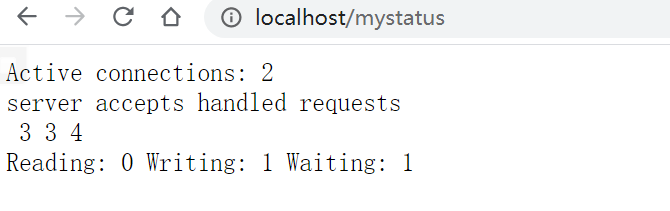 解释见文档
解释见文档
4.2.3. 参考
4.3. HTTP内容替换
4.3.1. 语法
# 把string替换为replacement
Syntax:	sub_filter string replacement;
Default:	—
Context:	http, server, location

# 用于缓存。last_modified头
Syntax:	sub_filter_last_modified on | off;
Default:
sub_filter_last_modified off;
Context:	http, server, location
This directive appeared in version 1.5.1.

# 默认只匹配第一个
Syntax:	sub_filter_once on | off;
Default:
sub_filter_once on;
Context:	http, server, location
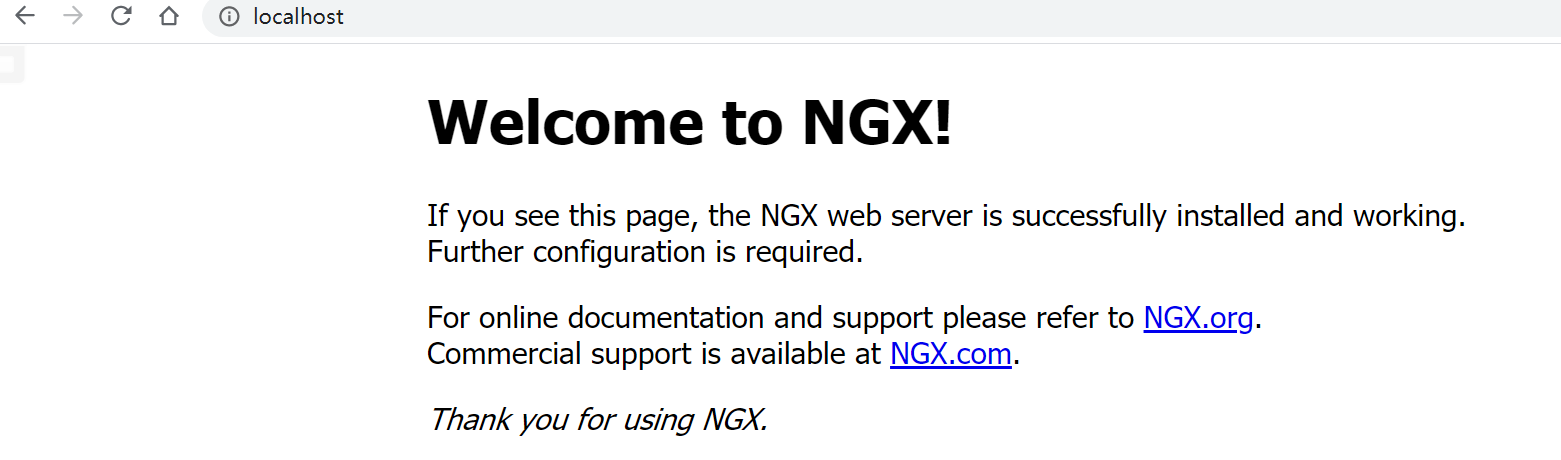
4.3.2. 例子
server {
    location / {
        root   html;
        index  index.html index.htm;
        # 把Nginx替换为NGX
        sub_filter 'Nginx' 'NGX';
        # 所有的都替换
        sub_filter_once off;
    }
}
4.3.3. 参考
4.4. Nginx请求限制
4.4.1. 限制TCP连接数
4.4.1.1. 语法
Syntax:	limit_conn zone number;
Default:	—
Context:	http, server, location

Syntax:	limit_conn_zone key zone=name:size;
Default:	—
Context:	http
4.4.1.2. 例子
http
{
    limit_conn_zone $binary_remote_addr zone=conn_zone:1m;
    server {
        location / {
            root   html;
            index  index.html index.htm;
            limit_conn conn_zone 1;
        }
}
4.4.1.3. 参考
4.4.2. 限制HTTP请求数
4.4.2.1. 语法
Syntax:	limit_req zone=name [burst=number] [nodelay | delay=number];
Default:	—
Context:	http, server, location


Syntax:	limit_req_zone key zone=name:size rate=rate [sync];
Default:	—
Context:	http
4.4.2.2. 例子
http
{
    limit_req_zone $binary_remote_addr zone=req_zone:1m rate=1r/s;
    server {
        location / {
            root   html;
            index  index.html index.htm;
            limit_req zone=req_zone;
        }
}
4.4.2.3. 参考
4.5. Nginx访问控制
4.5.1. 基于IP的访问控制
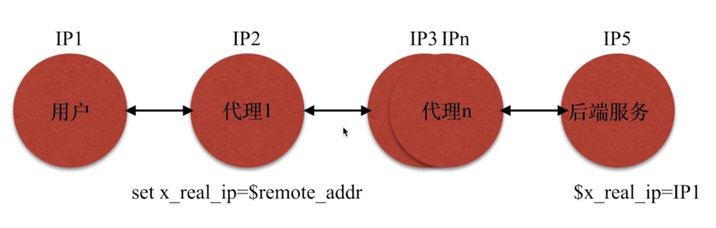
通过$remote_addr实现的访问控制,但是$remote_addr经过代理后会改变,如下图
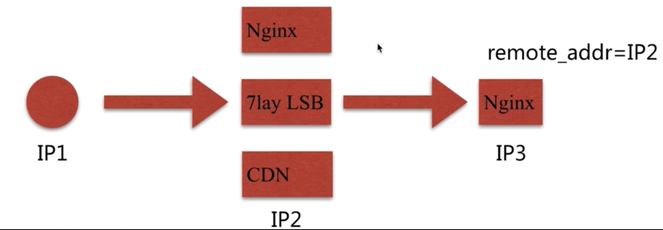 如何解决
如何解决
-
使用
x_forwarded_for,但是这个头不一定有,而且可以修改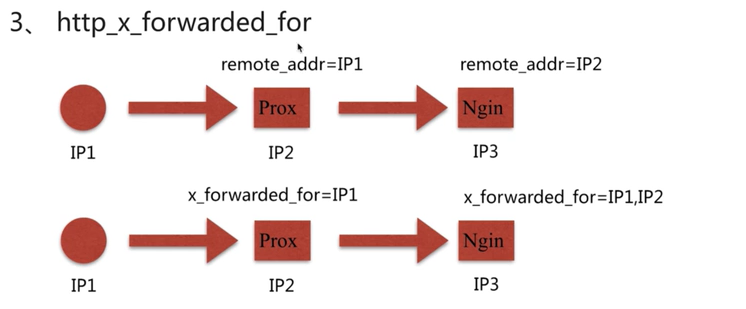
-
使用自定义变量传递
4.5.1.1. 语法
#允许什么IP访问
Syntax:	allow address | CIDR | unix: | all;
Default:	—
Context:	http, server, location, limit_except

#禁止什么IP访问
Syntax:	deny address | CIDR | unix: | all;
Default:	—
Context:	http, server, location, limit_except
4.5.1.2. 例子
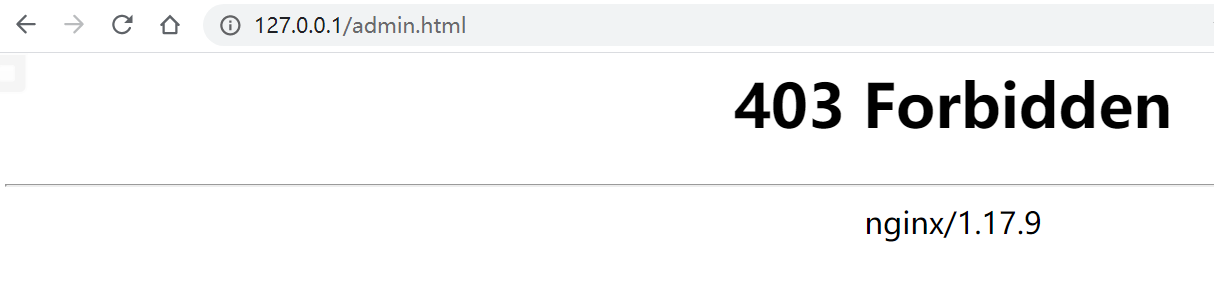
server {
    # 访问localhost/admin.html会在$HOME/software/code下找admin.html
    location ~ ^/admin.html {
        root   $HOME/software/code;
        # 不允许127.0.0.1访问
        deny 127.0.0.1;
        # 允许其他IP访问
        allow all;
    }
}
4.5.1.3. 参考
4.5.2. 登录控制
4.5.2.1. 语法
# 输入密码提示
Syntax:	auth_basic string | off;
Default:
auth_basic off;
Context:	http, server, location, limit_except

# 密码文件位置
Syntax:	auth_basic_user_file file;
Default:	—
Context:	http, server, location, limit_except
4.5.2.2. 例子
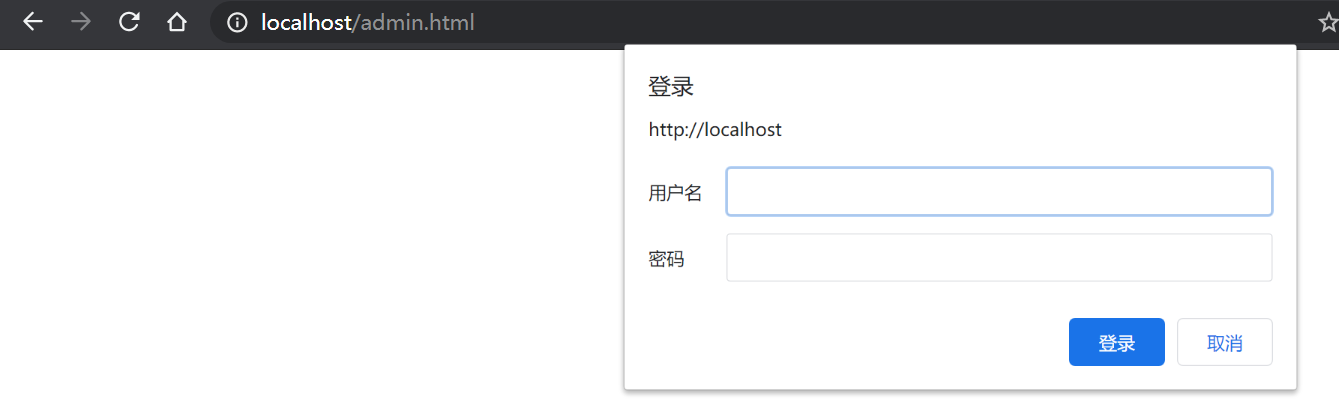
- 生成密码:
htpasswd -c ./auth_password nginxuser
location ~ ^/admin.html {
    root   $HOME/software/code;
    auth_basic "Auth access test! Input your password!";
    auth_basic_user_file $HOME/software/nginx/nginx/conf/conf.d/auth_password;
}
-
缺点 需要手动管理密码文件
-
解决 结合LUA 和LDAP打通
4.5.2.3. 参考
4.5.3. secure_link
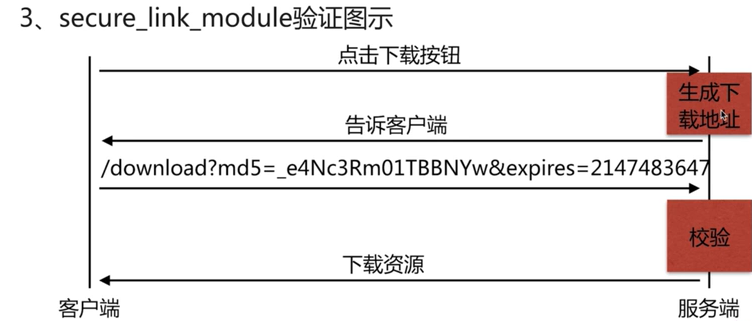
4.5.3.1. 语法
Syntax:	secure_link expression;
Default:	—
Context:	http, server, location

Syntax:	secure_link_md5 expression;
Default:	—
Context:	http, server, location
4.5.3.2. 例子
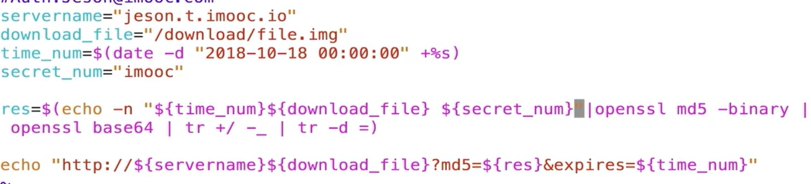
location / {
    #从url中取出md5参数和expires参数
    secure_link $arg_md5,$arg_expires;
    #对(expires参数+uri,key)计算md5,结果跟参数中的md5对比
    secure_link_md5 "$secure_link_expires$uri imooc";

    # 没有带参数那么返回403
    if ($secure_link = "") {
        return 403;
    }

    if($secure_link = "0") {
        return 410;
    }
    root $HOME/software/code;
}
4.5.3.3. 参考
4.6. Nginx作为静态资源WEB服务

4.6.1. gzip
4.6.1.1. 语法
# 使用sendfile传输文件
Syntax:	sendfile on | off;
Default:
sendfile off;
Context:	http, server, location, if in location


# 开启sendfile的情况下提高网络包的传输效率
# 其实就是缓冲网络包后一次性发送
Syntax:	tcp_nopush on | off;
Default:
tcp_nopush off;
Context:	http, server, location

# keepalive连接下,提高网络包的传输实时性
Syntax:	tcp_nodelay on | off;
Default:
tcp_nodelay on;
Context:	http, server, location

# 使用gzip压缩
Syntax:	gzip on | off;
Default:
gzip off;
Context:	http, server, location, if in location
# 压缩比例
Syntax:	gzip_comp_level level;
Default:
gzip_comp_level 1;
Context:	http, server, location
# gzip版本
Syntax:	gzip_http_version 1.0 | 1.1;
Default:
gzip_http_version 1.1;
Context:	http, server, location
# gzip类型
Syntax:	gzip_types mime-type ...;
Default:
gzip_types text/html;
Context:	http, server, location
# 开启gzip预读功能,如果有gzip文件,那么返回gzip文件
Syntax:	gzip_static on | off | always;
Default:
gzip_static off;
Context:	http, server, location
4.6.1.2. 使用
#访问.html等文件
location ~ .*\.(txt|xml|html|js|css)$ {
    root $HOME/software/code;
    gzip on;
    gzip_http_version 1.1;
    gzip_comp_level 1;
    gzip_types text/plain text/html text/css text/xml application/javascript;
}
#下载文件
location ~ ^/download {
    gzip_static on;
    tcp_nopush on;
    root $HOME/software/code;
}
-
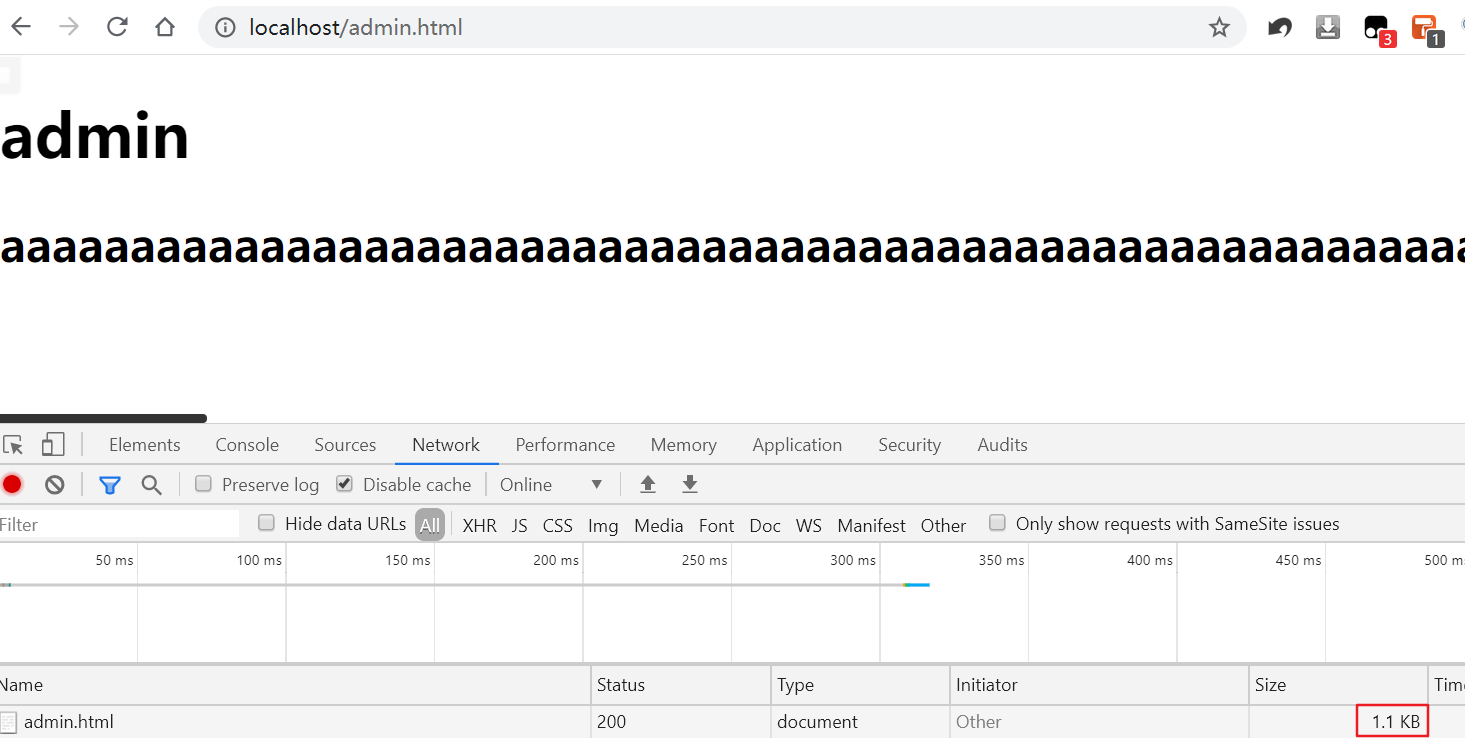
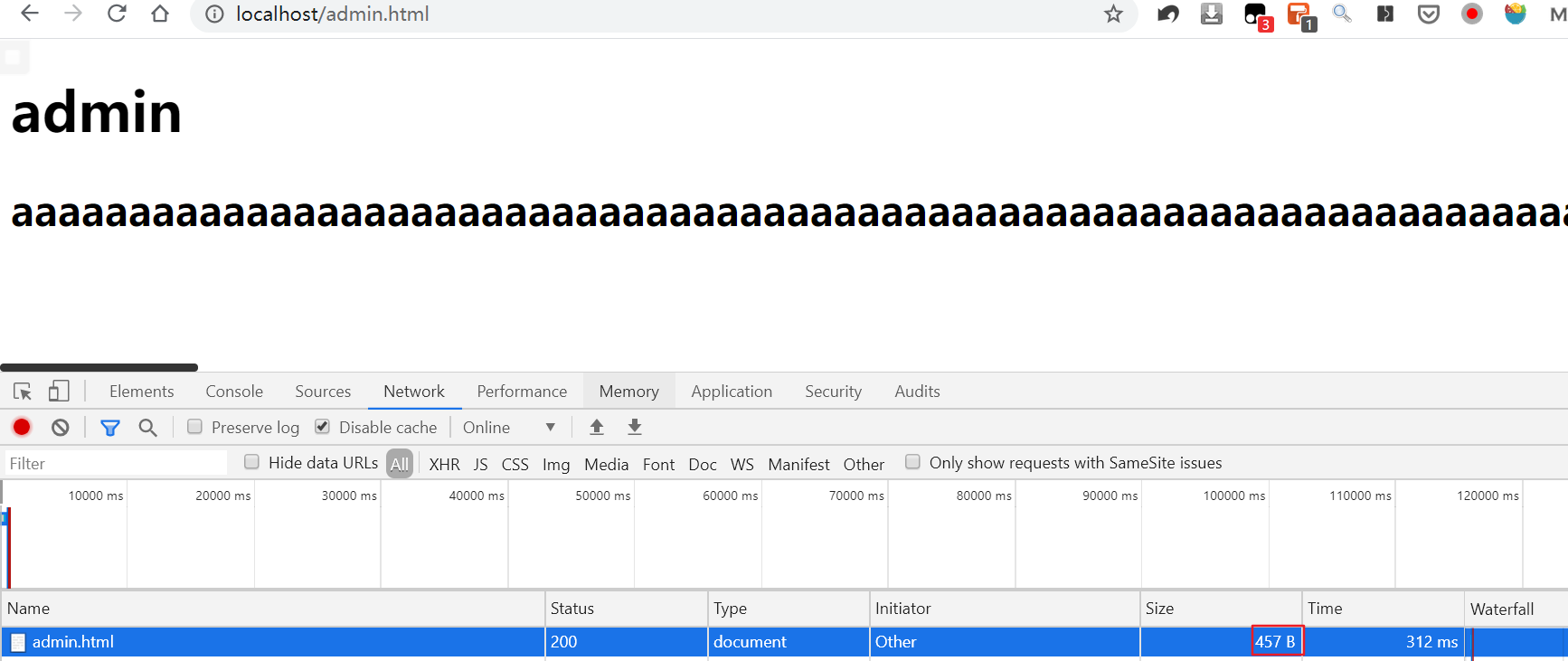
文本压缩前后对比
-
gzip预读功能 首先压缩文件:
gzip ./test.mp4其次访问http://localhost/download/test.mp4
4.6.1.3. 参考
4.6.2. 客户端缓存
默认Nginx什么都不配置,浏览器会使用ETag和Last-Modified
- 第一次访问:

- 第二次访问:

4.6.2.1. 语法
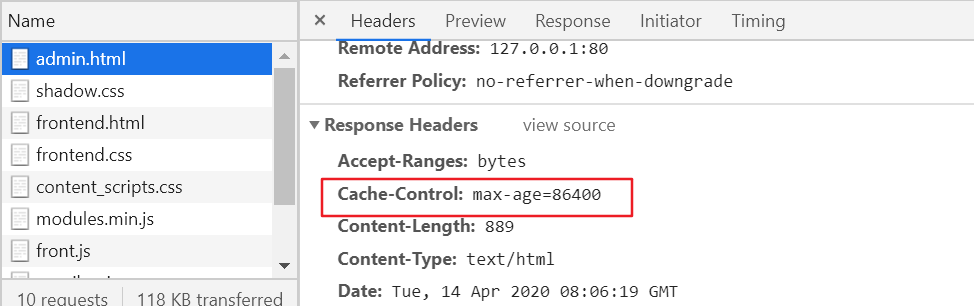
#设置Cache-Control:max-age=time,只要不超过这个时间那么浏览器直接使用本地缓存(200),不用请求服务器(304)
Syntax:	expires [modified] time;
expires epoch | max | off;
Default:
expires off;
Context:	http, server, location, if in location
4.6.2.2. 例子
location ~ .*\.(txt|xml|html|js|css)$ {
    expires 24h;
    root $HOME/software/code;
}
4.6.2.3. 参考
4.6.3. 跨域访问
4.6.3.1. 语法
#增加requset header
Syntax:	add_header name value [always];
Default:	—
Context:	http, server, location, if in location
4.6.3.2. 例子
location ~ .*\.(txt|xml|html|js|css)$ {
    add_header Access-Control-Allow-Origin *;
    add_header Access-Control-Allow-Methods GET,POST,PUT,DELETE,OPTIONS;
    root $HOME/software/code;
}
server {
set $cors_origin "";
set $cors_cred "";
set $cors_header "";
set $cors_method "";
if ($http_origin ~ \.qq\.com) {
set $cors_origin $http_origin;
set $cors_cred true;
set $cors_header "DNT,X-Mx-ReqToken,Keep-Alive,User-Agent,X-Requested-With,If-Modified-Since,Cache-Control,Content-Type,Authorization";
set $cors_method "GET,POST,OPTIONS";
}
add_header Access-Control-Allow-Origin $cors_origin;
add_header Access-Control-Allow-Credentials $cors_cred;
add_header Access-Control-Allow-Headers $cors_header;
add_header Access-Control-Allow-Methods $cors_method;
}4.6.3.3. 参考
4.6.4. 防盗链
4.6.4.1. 语法
# 校验请求头中的referer
Syntax:	valid_referers none | blocked | server_names | string ...;
Default:	—
Context:	server, location
4.6.4.2. 例子
location ~ .*\.(jpg|gif|png)$ {
    root $HOME/software/code/images;
    valid_referers none blocked 127.0.0.1;
    if ($invalid_referer)  {
        return 403;
    }
}
4.6.4.3. 参考
4.7. Nginx作为代理服务
4.7.1. 正向/反向代理
正向代理和反向代理的区别在于前者代理的是客户端,后者代理的是服务器
4.7.1.1. 语法
Syntax:	proxy_pass URL;
Default:	—
Context:	location, if in location, limit_except
4.7.1.2. 例子
- 正向代理
server {
    #设置了一个DNS罢了
    resolver 8.8.8.8;
    location / {
        #请求什么网,原样请求出去
        proxy_pass http://$http_host$request_uri;
    }
}- 反向代理
server {
    #这个会在url后面拼接/baidu,即http://www.baidu.com/baidu
    location /baidu {
        proxy_pass http://www.baidu.com;
    }
    #这个会在url后面拼接/baidu-cache,即http://www.baidu.com/baidu-cache
    location /baidu—cache {
        proxy_pass http://www.baidu.com;

        #设置头信息
        proxy_redirect default;
        proxy_set_header Host $http_host;
        proxy_set_header X-Real-IP $remote_addr;

        proxy_connect_timeout 30;
        proxy_send_timeout 60;
        proxy_read_timeout 60;

        #设置缓存
        proxy_buffer_size 32k;
        proxy_buffering on;
        proxy_buffers 4 128k;
        proxy_busy_buffers_size 256k;
        proxy_max_temp_file_size 256k;
    }
}
4.7.1.3. 参考
4.7.2. 负载均衡
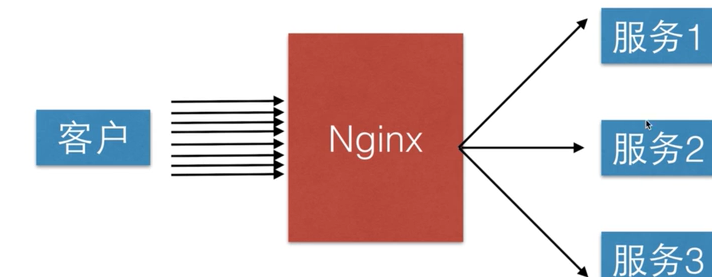
4.7.2.1. 语法
# 上游服务器的地址
Syntax:	upstream name { ... }
Default:	—
Context:	http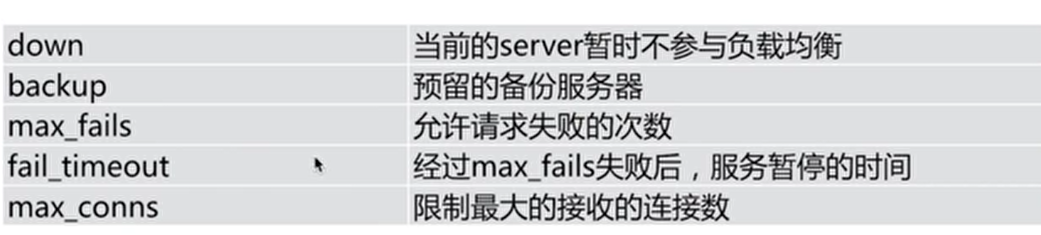
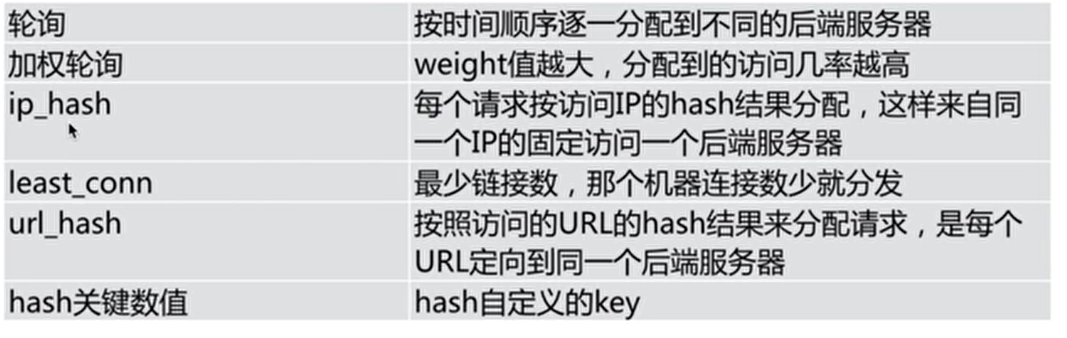
4.7.2.2. 例子
#定义上游服务器
upstream ngx {
    #hash $request_uri;
    #ip_hash;
    # 后面开可以加down、backup、max_fails等参数
    server 127.0.0.1:8080 weight 5;
    server 127.0.0.1:8081;
    server 127.0.0.1:8082;
}

#以下总共启动了80、8080、8081、8082四个服务器
server {
    listen       80;
    server_name  localhost;
    location / {
        proxy_pass http://ngx;
    }
}

server {
    listen       8080;
    server_name  localhost;


    location / {
       root $HOME/software/nginx/nginx/html;
       index 8080.html;
    }
}

server {
    listen       8081;
    server_name  localhost;


    location / {
       root $HOME/software/nginx/nginx/html;
       index 8081.html;
    }
}

server {
    listen       8082;
    server_name  localhost;


    location / {
       root $HOME/software/nginx/nginx/html;
       index 8082.html;
    }
}
4.7.2.3. 参考
4.7.3. 服务器缓存
4.7.3.1. 语法
Syntax:	proxy_cache zone | off;
Default:
proxy_cache off;
Context:	http, server, location

Syntax:	proxy_cache_path path [levels=levels] [use_temp_path=on|off] keys_zone=name:size [inactive=time] [max_size=size] [manager_files=number] [manager_sleep=time] [manager_threshold=time] [loader_files=number] [loader_sleep=time] [loader_threshold=time] [purger=on|off] [purger_files=number] [purger_sleep=time] [purger_threshold=time];
Default:	—
Context:	http

#缓存过期
Syntax:	proxy_cache_valid [code ...] time;
Default:	—
Context:	http, server, location

#缓存的维度
Syntax:	proxy_cache_key string;
Default:
proxy_cache_key $scheme$proxy_host$request_uri;
Context:	http, server, location

#不缓存某些页面
Syntax:	proxy_no_cache string ...;
Default:	—
Context:	http, server, location
4.7.3.2. 例子
upstream ngx {
    server 127.0.0.1:8080;
    server 127.0.0.1:8081;
    server 127.0.0.1:8082;
}

proxy_cache_path /tmp levels=1:2 keys_zone=ngx_cache:10m max_size=10g inactive=60m use_temp_path=off;

server {
    listen       80;
    server_name  localhost;

    if ($request_uri ~^/(url3|login|register|password)) {
        set $cookie_nocache 1;
    }

    location / {
        proxy_pass http://ngx;

        proxy_cache ngx_cache;
        proxy_cache_valid 200 304 12h;
        proxy_cache_valid any 10m;
        proxy_cache_key $host$uri$is_args$args;
        add_header Nginx-Cache "$upstream_cache_status";
        proxy_no_cache $cookie_nocache $arg_nocache $arg_comment;
        proxy_no_cache $http_pragma $http_authorization;
        proxy_next_upstream error timeout invalid_header http_500 http_502 http_503 http_504;
    }
}
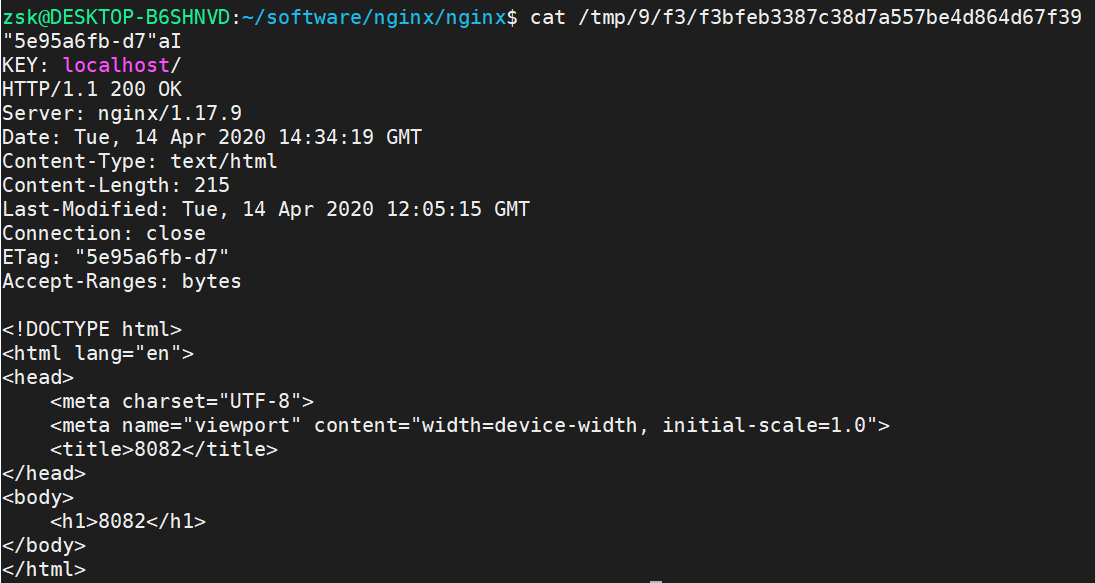
会发现本来Nginx默认是轮询算法,但是一直刷新页面访问的都是同一个,说明缓存生效了,可以再/tmp目录下看到缓存的内容
4.7.3.3. 参考
4.7.4. 动静分离
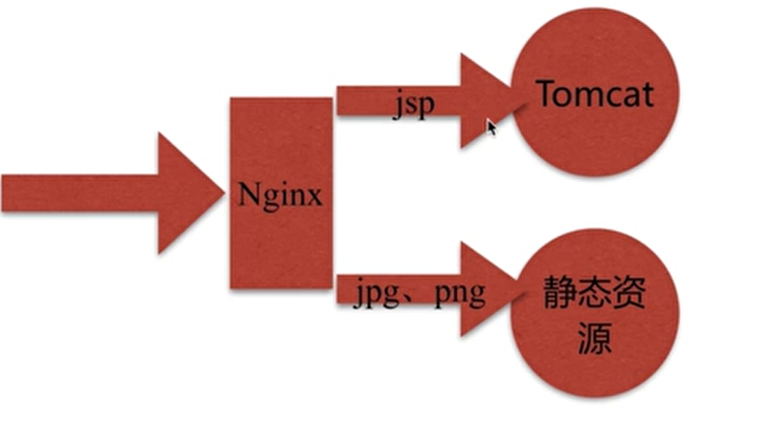
通过中间件将动态请求和静态请求分离; 说白了无非就是Nginx负责响应HTML、CSS、JS,而Ajax请求则由Tomcat负责
4.7.4.1. 例子
upstream java_api {
    server 127.0.0.1:8000;
}

server {
    listen       80;
    server_name  localhost;

    location ~ \.jsp$ {
         proxy_pass http://java_api;
         index index.html index.htm;
    }

    location ~ \.(jpg|png|gif)$ {
        expires 1h;
        gzip on;
    }
}
4.8. rewrite规则
4.8.1. 语法
# 把URL中的regex替换成replacement
Syntax:	rewrite regex replacement [flag];
Default:	—
Context:	server, location, if
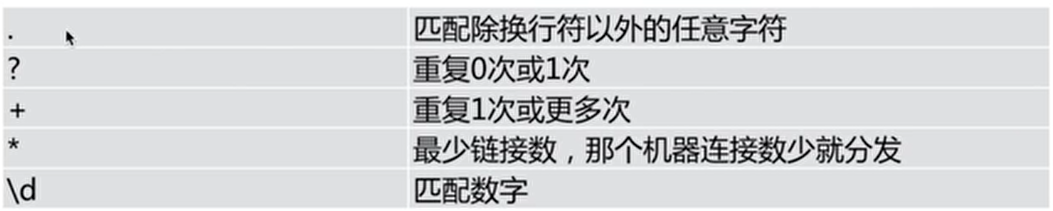
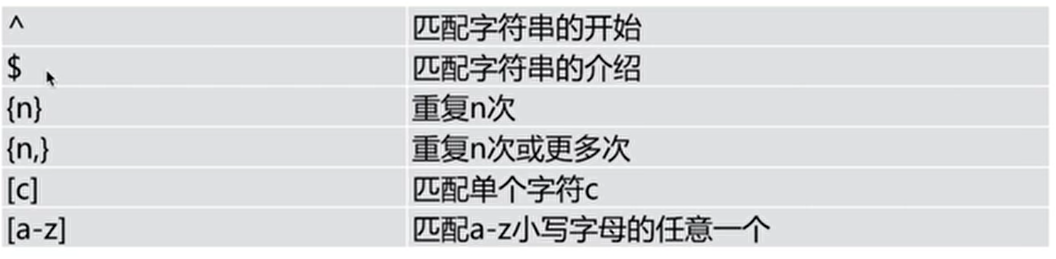
4.8.1.1. 正则语法


4.8.1.2. flag
- redirect:返回302临时重定向,浏览器地址栏会显示跳转后的URL地址,爬虫不会更新URL
- permanent:返回301永久重定向,浏览器地址栏会显示跳转后的URL地址,爬虫会更新URL
- break:停止处理后续rewrite指令集,不会跳出location作用域,不再进行重新查找,终止匹配,URL地址不变
- last:停止处理后续rewrite指令集,跳出location作用域,并开始搜索与更改后的URI相匹配的location,URL地址不变
其中redirect和permanent很好理解,直接对URL地址进行重定向,显示跳转后的URL地址,从实现功能的角度看,redirect和permanent是一样的,不存在好坏和性能上的问题,主要会对seo所有影响。
4.8.2. 例子
location ~ ^/break {
    # 把URL中的/last重写为/test/,last不会重新匹配location
    rewrite ^/break /test/ break;
}

location ~ ^/last {
    # 把URL中的/last重写为/test/,last会重新匹配location
    rewrite ^/last /test/ last;
}

# 访问/test/会返回json数据,访问/test404
location /test/ {
    default_type application/json;
    return 200 '{"status" :"success"}';
}


location ~ ^/redirect {
    # 访问/redirect会跳转到/test/
    rewrite ^/redirect /test/ redirect;
}

location ~ ^/permanent {
    # 访问/permanent会跳转到/test/
    rewrite ^/permanent /test/ permanent;
}

location / {
    # 如果访问http://localhost/courses-11-22-1.html
    # 会转成courses/11/22/course_1.html
    # 最后会访问$HOME/software/code/courses/11/22/course_1.html
    rewrite ^/courses-(\d+)-(\d+)-(\d+)\.html$ /courses/$1/$2/course_$3.html break;

    #如果是Chrome浏览器那么跳转到http://www.baidu.com
    if ($http_user_agent ~* Chrome) {
        rewrite ^/(.*)$ http://www.baidu.com redirect;
    }
    #如果不是文件浏览器那么跳转到http://www.google.com
    if (!-f $request_filename) {
        rewrite ^/(.*)$ http://www.google.com/$1 redirect;
    }

    root $HOME/software/code;
    index index.html index.htm;

}
4.8.3. 参考
4.9. 配置HTTPS
4.9.1. 语法
现代 Nginx 使用 listen 443 ssl; 开启 HTTPS;旧的 ssl on 指令已经移除。
listen 443 ssl;
ssl_certificate file;
ssl_certificate_key file;
ssl_protocols TLSv1.2 TLSv1.3;
4.9.2. 例子
- 生成证书
#!/usr/bin/env bash
#生成private key
openssl genpkey -algorithm RSA -pkeyopt rsa_keygen_bits:2048 -out server.key
#生成证书请求文件
openssl req -new -key server.key -out server.csr
#生成证书文件
openssl x509 -req -days 365 -in server.csr -signkey server.key -out server.crt

#转换成netty的格式
openssl pkcs8 -topk8 -nocrypt -in server.key -out server_pkcs8.key

#转换成tomcat
openssl pkcs12 -export -in server.crt -inkey server.key -out keystore.p12 -name server


#生成haproxy所需的证书格式
cat server.crt server.key > server.pem- 配置Nginx
server {
    listen 443 ssl;
    server_name 127.0.0.1;
    ssl_certificate $HOME/software/code/server.crt;
    ssl_certificate_key $HOME/software/code/server.key;
    ssl_protocols TLSv1.2 TLSv1.3;

    index index.html;
    location / {
        root $HOME/software/code;
    }
}
4.9.3. 参考
5. LUA
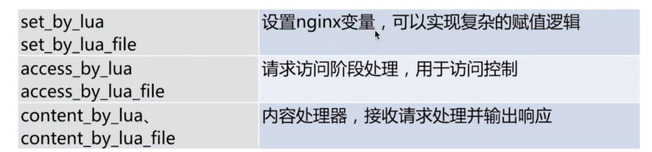
5.1. 处理阶段
5.2. Lua API
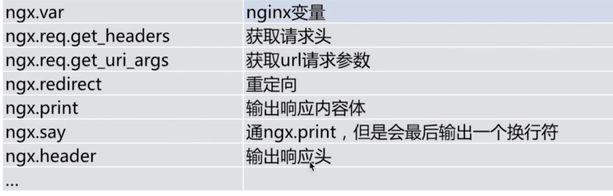
5.3. 例子
location /hello {
	default_type 'text/plain';
	content_by_lua 'ngx.say("Hello, Lua")';
}


location /myip {
	default_type 'text/plain';
	content_by_lua '
		clientIP = ngx.req.get_headers()["x_forwarded_for"];
		ngx.say("IP:", clientIP);
	';
}


location / {
	default_type 'text/html';
	content_by_lua_file $HOME/software/code/dep.lua;
}- dep.lua
ngx.say("Hello, Lua file")6. 优化
6.1. CPU亲和
- CPU核数
# cpu个数 1
cat /proc/cpuinfo | grep "physical id" | sort |uniq|wc -l

# 每个cpu核数 6
cat /proc/cpuinfo | grep "cpu cores" | uniq

# 总cpu核心 6
cat /proc/cpuinfo |grep "processor" | wc -l- nginx.conf
#CPU数目
worker_processes 1;
#有n个CPU核数就有n个n bit
worker_cpu_affinity 000001 000010 000100 001000 010000 100000

events {
    use epoll;
    worker_connections 10240;
}
6.2. 文件句柄
- /etc/security/limits.conf
root soft nofile 65535
root hard nofile 65535
* soft nofile 25535
* hard nofile 25535- nginx.conf
worker_rlimit_nofile 35535;

events {...}

http {...}
7. 通用配置
user nginx;
worker_processes 16;
worker_cpu_affinity auto;

error_log /var/log/nginx/error.log warn;
pid /var/run/nginx.pid;

worker_rlimit_nofile 35535;

events {
    use epoll;
    worker_connections 10240;
}


http {
    include /etc/nginx/mime.types;
    default_type application/octet-stream;
    charset utf-8;

    log_format main;

    sendfile on;
    keepalive_timeout 65;

    gzip on;
    gzip_disable "MSIE [1-6]\.";
    gzip_http_version 1.1;

    include /etc/nginx/conf.d/*.conf;
}
8. FAQ
8.1. 一个server里有多个location的优先级
| 模式 | 含义 | |
|---|---|---|
| location = /uri | = 表示精确匹配,只有完全匹配上才能生效 | |
| location ^~ /uri | ^~ 开头对URL路径进行前缀匹配,并且在正则之前 | |
| location ~ pattern | 开头表示区分大小写的正则匹配 | |
| location ~* pattern | 开头表示不区分大小写的正则匹配 | |
| location /uri | 不带任何修饰符,也表示前缀匹配,但是在正则匹配之后 | |
| location / | 通用匹配,任何未匹配到其它location的请求都会匹配到,相当于switch中的default |
多个 location 配置的情况下匹配顺序为:
- 首先精确匹配 =
- 其次前缀匹配 ^~
- 其次是按文件中顺序的正则匹配
- 然后匹配不带任何修饰的前缀匹配。
- 最后是交给 / 通用匹配
当有匹配成功时候,停止匹配,按当前匹配规则处理请求
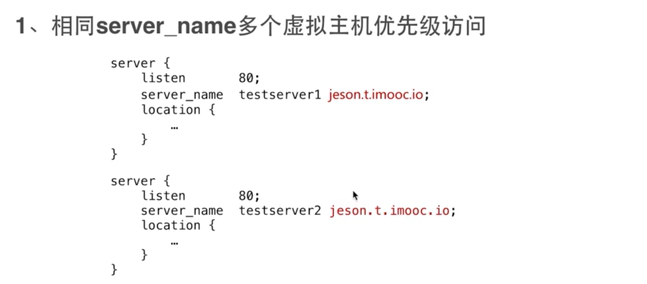
8.2. 多个相同的server_name优先级
不会报错,会找第一个匹配到的
8.3. root和alias的区别
- root会把location自己+location后面的路径拼接在root后面
- alias会把location后面的路径拼接在alias后面
location /static/imgs {
    root $HOME/static/imgs;
}

location /static/imgs {
    alias $HOME/static/imgs;
}
8.4. 获取用户真实的IP
如果 Nginx 位于可信反向代理之后,应先配置可信代理范围,再使用 Real IP 模块解析客户端地址;不能直接信任来自任意客户端的 X-Forwarded-For。
8.5. try_files
按顺序检查文件是否存在
当用户请求 http://localhost/example 时,这里的 $uri 就是 /example。
- try_files 会到硬盘里尝试找这个文件。如果存在名为 $HOME/software/nginx/nginx/cache/example的文件,就直接把这个文件的内容发送给用户。
- 显然,目录中没有叫 example 的文件。然后就看 $uri/,增加了一个 /,也就是看有没有名为 $HOME/software/nginx/nginx/cache/example/ 的目录。
- 又找不到,就会 fall back 到 try_files 的最后一个选项 @java_page,根据@java_page配置进行内部重定向。
location / {
    root $HOME/software/nginx/nginx/cache;
    try_files $uri $uri/ @java_page;
}

location @java_page {
    proxy_pass http://127.0.0.1:9090;
}
8.6. 常见错误码
- 413 用户上传文件限制client_max_body_size
- 502 上游服务无响应
- 504 上游服务响应超时