
NOTE
1.1 Nginx
Original Nginx study note: characteristics, configuration, Lua, optimization, general configuration, and FAQ.
This is a historical learning note and may contain outdated or incomplete understanding.
1. What Is Nginx
Nginx is a web server that became well known for addressing the C10K class of concurrency problems. It can be used as:
- a virtual host server: one machine can host multiple sites;
- a reverse proxy: requests are forwarded to upstream servers;
- a load balancer: multiple upstream servers can sit behind the reverse proxy;
- a cache: responses from upstream services can be cached locally;
- a static/dynamic split: Nginx can serve static files directly and forward dynamic requests to an application server such as Tomcat.
2. Characteristics
2.1. I/O Multiplexing with epoll
-
Network I/O can be roughly divided into two phases:
- wait for data to become ready in the kernel;
- copy data from kernel space to user space.
-
Unix I/O models differ in how applications wait for readiness and perform the actual read/write operation. Common models include blocking I/O, non-blocking I/O, I/O multiplexing, and signal-driven/asynchronous mechanisms.
- Blocking I/O: the call waits until the operation can proceed.
- Non-blocking I/O: the call returns when it cannot proceed immediately and the application retries later.
- I/O multiplexing: one event loop can wait for readiness across many file descriptors instead of assigning one thread to every connection.
- Signal-driven I/O: the operating system notifies the application when an event is ready.
- A socket is represented by a file descriptor on Unix-like systems. Nginx can register many connection file descriptors with an event facility such as epoll and process them as events become ready.
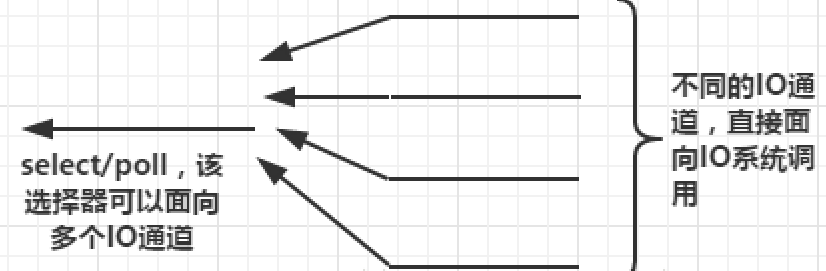
select,poll, andepollare different mechanisms for observing readiness across multiple descriptors. On Linux, Nginx typically uses epoll when available.
2.2. CPU Affinity
A worker can be pinned to specific CPU cores. This can reduce migrations between CPUs and improve cache locality in some workloads. It should be measured rather than treated as a universal tuning requirement.
2.3. sendfile
sendfile can let the kernel transfer file data to a socket with fewer user-space copies, which is useful for static-file serving.
3. Build and Installation
See the source-build note in this category.
4. Configuration
The original note groups most practical Nginx knowledge here.
4.1. Log Configuration
4.1.1. Syntax
A log format is defined with log_format, and access logs are written with access_log.
log_format main '$remote_addr - $remote_user [$time_local] "$request" '
                '$status $body_bytes_sent "$http_referer" '
                '"$http_user_agent" "$http_x_forwarded_for"';

access_log logs/access.log main;
4.1.2. Example
Choose fields that help answer operational questions such as client address, request, status, bytes, user agent, and proxy forwarding information.
4.1.3. References
4.2. Status
4.2.1. Syntax
The stub status module exposes basic connection/request counters.
location = /basic_status {
    stub_status;
}
4.2.2. Example
Restrict the status endpoint to trusted networks if it is enabled outside local development.
4.2.3. References
4.3. HTTP Content Replacement
4.3.1. Syntax
The sub_filter module can replace matching response-body text for supported content types.
sub_filter 'string' 'replacement';
sub_filter_once on;
4.3.2. Example
Use response rewriting only when it is really needed; it couples the proxy layer to response content and can interfere with caching/compression.
4.3.3. References
4.4. Nginx Request Limits
4.4.1. Limit TCP Connections
limit_conn_zone defines the shared state and key, while limit_conn applies the connection limit.
limit_conn_zone $binary_remote_addr zone=conn_zone:10m;

server {
    location /download/ {
        limit_conn conn_zone 1;
    }
}
4.4.2. Limit HTTP Request Rate
limit_req_zone defines a request-rate bucket and limit_req applies it.
limit_req_zone $binary_remote_addr zone=req_zone:10m rate=1r/s;

server {
    location /api/ {
        limit_req zone=req_zone burst=5 nodelay;
    }
}
4.5. Nginx Access Control
4.5.1. IP-Based Access Control
allow and deny can restrict access by address.
location /admin/ {
    allow 10.0.0.0/8;
    deny all;
}
Forwarded client-IP headers must be trusted only from known reverse proxies; arbitrary clients can forge X-Forwarded-For.
4.5.2. Login Control
HTTP Basic Authentication can be configured with auth_basic and auth_basic_user_file.
htpasswd -c ./auth_password nginxuserlocation /admin/ {
auth_basic "Restricted";
auth_basic_user_file $HOME/software/nginx/conf/auth_password;
}4.5.3. secure_link
The secure-link module can validate a token/expiration derived from request parameters and a shared secret.
4.6. Nginx as a Static Resource Web Server
4.6.1. gzip
Common options include sendfile, tcp_nopush, tcp_nodelay, and gzip-related directives.
sendfile on;
tcp_nopush on;
gzip on;
gzip_comp_level 4;
gzip_types text/plain text/css application/javascript application/json;
4.6.2. Client Cache
Response headers such as Expires and Cache-Control tell clients how long static resources may be reused.
location ~* \.(png|jpg|jpeg|gif|css|js)$ {
    expires 7d;
}
4.6.3. Cross-Origin Access
CORS response headers can be added when a resource is intentionally shared across origins. The origin/method/header policy should be as narrow as the application needs.
4.6.4. Hotlink Protection
The valid_referers directive can be used as a lightweight hotlinking control, although the Referer header is not a strong authentication mechanism.
4.7. Nginx as a Proxy Service
4.7.1. Forward / Reverse Proxy
The original note focuses on reverse proxying: the client talks to Nginx, and Nginx talks to an upstream service.
location /api/ {
    proxy_pass http://127.0.0.1:8080;
    proxy_set_header Host $http_host;
    proxy_set_header X-Real-IP $remote_addr;
}
4.7.2. Load Balancing
An upstream block groups backend servers.
upstream app_backend {
    server 127.0.0.1:8080;
    server 127.0.0.1:8081;
}

server {
    location / {
        proxy_pass http://app_backend;
    }
}
Nginx supports strategies such as round robin, weights, hashing, and health/failure handling depending on configuration and edition/modules.
4.7.3. Server Cache
A reverse proxy can cache upstream responses.
proxy_cache_path /tmp/nginx-cache levels=1:2 keys_zone=ngx_cache:10m max_size=10g inactive=60m use_temp_path=off;

location / {
    proxy_cache ngx_cache;
    proxy_cache_valid 200 304 12h;
    proxy_cache_valid any 10m;
    proxy_pass http://app_backend;
}
Caching rules must account for authentication, cookies, Vary, request methods, and application-specific correctness.
4.7.4. Static/Dynamic Split
Serve static resources directly from Nginx and proxy application requests to the backend when that separation fits the deployment.
4.8. rewrite Rules
4.8.1. Syntax
rewrite changes a URI using a regular expression and replacement.
rewrite regex replacement [flag];Flags such as last, break, redirect, and permanent have different control-flow behavior.
4.8.2. Example
location /test/ {
    rewrite ^/test/(.*)$ /$1 break;
}
4.8.3. References
4.9. Configure HTTPS
4.9.1. Syntax
Modern Nginx enables TLS on the listen directive. The old ssl on; directive has been removed.
listen 443 ssl;
ssl_certificate /path/to/server.crt;
ssl_certificate_key /path/to/server.key;
ssl_protocols TLSv1.2 TLSv1.3;
4.9.2. Example
For a local self-signed test certificate:
openssl genpkey -algorithm RSA -pkeyopt rsa_keygen_bits:2048 -out server.key
openssl req -new -key server.key -out server.csr
openssl x509 -req -days 365 -in server.csr -signkey server.key -out server.crt
server {
listen 443 ssl;
server_name 127.0.0.1;
ssl_certificate $HOME/software/code/server.crt;
ssl_certificate_key $HOME/software/code/server.key;
ssl_protocols TLSv1.2 TLSv1.3;
index index.html;
location / {
root $HOME/software/code;
}
}4.9.3. References
5. LUA
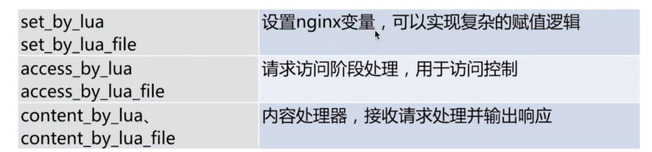
5.1. Processing Phases
OpenResty/lua-nginx-module exposes hooks at multiple Nginx request-processing phases.
5.2. Lua API
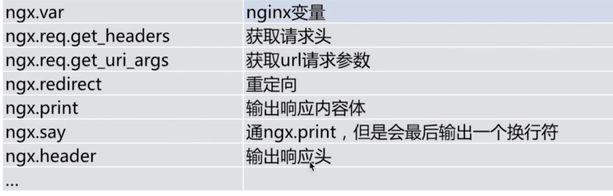
5.3. Example
location /hello {
    default_type 'text/plain';
    content_by_lua 'ngx.say("Hello, Lua")';
}

location /myip {
    default_type 'text/plain';
    content_by_lua '
        local headers = ngx.req.get_headers()
        ngx.say("X-Forwarded-For:", headers["x_forwarded_for"] or "")
    ';
}

location /dep {
    content_by_lua_file $HOME/software/code/dep.lua;
}
Do not treat arbitrary X-Forwarded-For input as a trusted client address unless the immediate proxy is trusted and Nginx is configured to parse trusted forwarding headers.
6. Optimization
6.1. CPU Affinity
The original note shows explicit worker-to-core masks. Modern Nginx can also use:
worker_processes auto;
worker_cpu_affinity auto;
CPU affinity is a tuning option, not a requirement; validate it with measurements.
6.2. File Descriptors
High-concurrency servers may need sufficient process and operating-system file-descriptor limits.
worker_rlimit_nofile 65535;

events {
    worker_connections 10240;
}
The effective maximum is still bounded by OS limits, upstream connections, memory, and workload characteristics.
7. General Configuration
A representative configuration keeps global, events, and http settings separated and includes per-site files when appropriate.
worker_processes auto;

events {
    worker_connections 10240;
}

http {
    include       mime.types;
    default_type  application/octet-stream;
    sendfile      on;
    keepalive_timeout 65;
    include conf.d/*.conf;
}
8. FAQ
8.1. Priority When One server Has Multiple location Blocks
Nginx location matching distinguishes exact matches, prefix matches, and regular-expression locations. The detailed precedence rules matter when multiple locations can match the same URI.
8.2. Priority of Multiple Identical server_name Values
Avoid ambiguous duplicate server_name definitions in the same listen context. The selected virtual server depends on listen address/port, hostname matching, and default-server rules.
8.3. Difference Between root and alias
root appends the request URI to the configured path. alias replaces the matched location prefix with the configured filesystem path.
location /static/imgs/ {
    root $HOME;
}

location /images/ {
    alias $HOME/static/imgs/;
}
8.4. Get the Real Client IP
When Nginx is behind a trusted reverse proxy, configure the Real IP module with trusted proxy ranges and the header used by that proxy. Do not trust client-supplied forwarding headers from arbitrary networks.
8.5. try_files
try_files checks files/directories in order and internally redirects to the final fallback when nothing matches.
location / {
    root $HOME/software/nginx/cache;
    try_files $uri $uri/ @java_page;
}

location @java_page {
    proxy_pass http://127.0.0.1:9090;
}
8.6. Common Error Codes
- 413: request body exceeds the configured body-size limit, commonly
client_max_body_size. - 502: Nginx could not get a valid response from the upstream.
- 504: upstream response timed out.